Edit units
If you have the right to edit an organisational unit, you can make various settings using the edit button.
General
You can add a description to the unit under the General tag. The standard formatting options are available in the text box.

General settings that you can make for the unit
You can also specify here whether the unit is displayed publicly and mark it as inactive if this unit is no longer active at the institute. The mandatory fields such as name and abbreviation can also be changed here, as can the colour. You can add a cost centre to this unit and link it to available research areas.
Personnel
Under Personnel, you can adjust the managers and add further employees to the organisational unit.

Here you can add further managers and adjust the order
If you want to assign more people to the organisational unit, you can do this by clicking the Add person button. Here you can select the name from a drop-down menu, specify the start date of the affiliation and determine whether the person is scientifically affiliated or not.
All added persons are listed under Directly assigned persons.
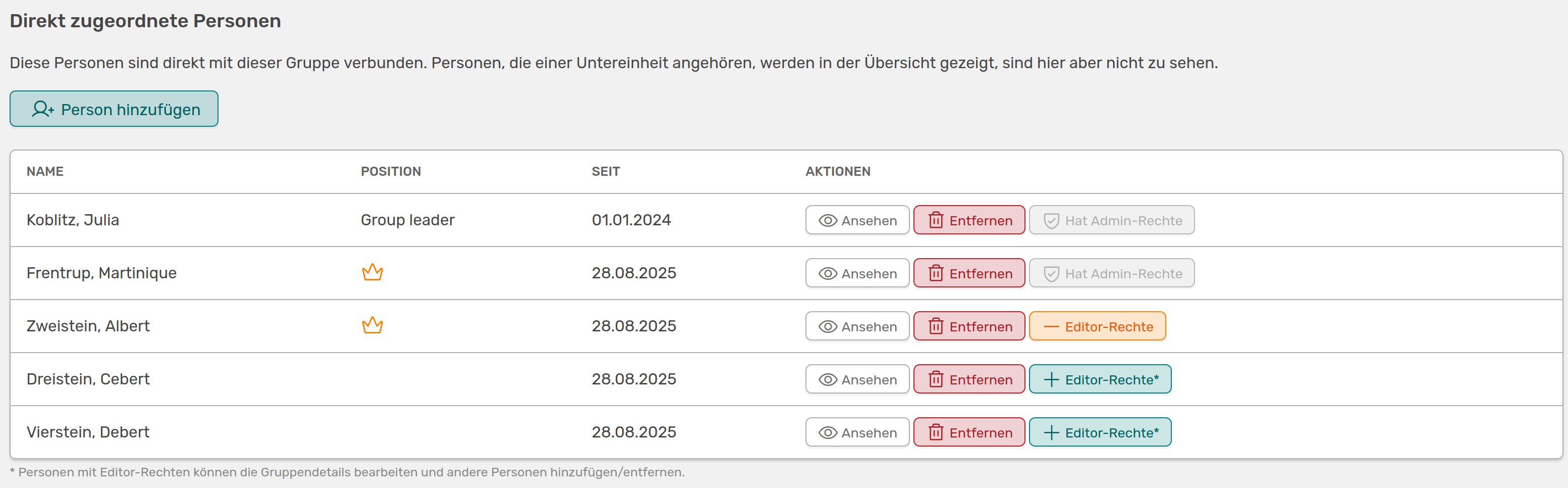
List of assigned persons with further setting options and the display of admin rights
In the list you can see which position the person has and since when they have been assigned to the unit. This date can only be customised by the person themselves.
For actions, you can access the person's profile directly via the View button. You can also delete the person from the list here and give them editor rights to this organisational unit. If the person has administrator rights and therefore has editor rights to organisational units anyway, this will be displayed instead of the editor button.
Research
Under this tab you can add research interests to the unit. Once you have added and saved a term, you can enter further details and link activities.

Adding research interests and linking them to activities
You can add a subtitle and a detailed description to your research interests, whereby all common formatting options are available to you here. In the search field, you can search for an activity that you would like to link to this interest. In contrast to linking to the unit itself, this is possible regardless of time - you can simply enter a term, press search and all activities found will be listed, which you can then add with one click. This link is not displayed in the extended activity view and is more for organising the literature.
Delete
Anyone who has editor rights for the unit can also delete it. It should be noted here that the removal of the unit cannot be undone and it is preferable to deactivate the unit under General.