edit content
Once you have created the activity, you can edit it as long as it has not yet been locked.
Edit authors
You can use the author editor to make further settings for the authors.

The author editor to make further settings
You can use the dots on the left to change the order of the names using drag & drop. You can set the position of the authors separately via a drop-down menu. You can specify both the affiliation to the institute and to the organisational unit for each name. Of course, you can also add more names to the list or remove names using the bin symbol on the right. The surname is a mandatory field, the first name can be omitted as an option.
In the example shown above, you can see that you do not have to belong to the institute to link the activities to the user profile. The second author in the list is assigned to a user account, but was not affiliated with the institute at the time of the work. The activity is linked to the account and is displayed in his profile, but he is not marked as an affiliated author in the report and does not receive any coins for the activity. You can also add authors who do not have a user account in OSIRIS.
Edit journal
Journals are relevant for Journal articles and Reviews & Editorials.
For reasons of standardisation, a journal cannot be entered as a free text field. Instead, the following module can be found:

Field for journals and reviews & editorials to specify the journal
If you click on the field, you can search for a journal by name or preferably by ISSN number. If there are several journals for the search used, they will be listed and you can add one of them to your activity by ticking the green box.
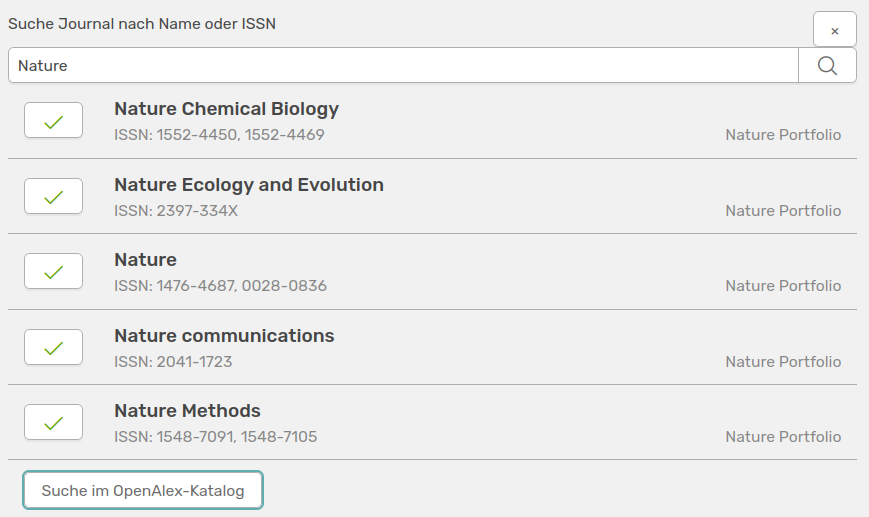
Search for a journal
If the journal you are looking for is not found, you can also search the OpenAlex catalogue using the button below.