Overview of the features of OSIRIS
📝 Core idea
OSIRIS stands for open, smart & intuitive research information system, and the first three words reflect the philosophy quite well. OSIRIS is as open as possible - this applies to both the source code and the licence. OSIRIS is as smart as possible - it takes work off your hands wherever possible and automates what is possible, but without patronising the user. OSIRIS is also as intuitive as it gets - sure, that's often in the eye of the beholder... but OSIRIS goes to great lengths to fulfil these requirements with a tidy and modern interface, good UX design and many accessibility functions.
The free demo is available here.
The most important core aspects:
- OSIRIS is a self-reporting system and is best suited for institutions without their own library or staff dedicated to maintaining research activities.
- OSIRIS works "out-of-the-box" to try it out, but it can also be configured a lot, e.g. you can create your own activity types, deactivate functions and configure roles.
- OSIRIS places a special focus on the researchers: all data is aggregated and displayed on their own profile pages, their own research can be analysed and their own CV can be downloaded.
- OSIRIS can also be used as a repository to a limited extent, as you can store files relating to activities. However, OSIRIS is not (yet) designed to actually serve as a repository.
- OSIRIS offers an add-on that can be used to display research on an external site (portfolio).
- OSIRIS is being actively developed further, not least because it is the newest member of the CRIS family.
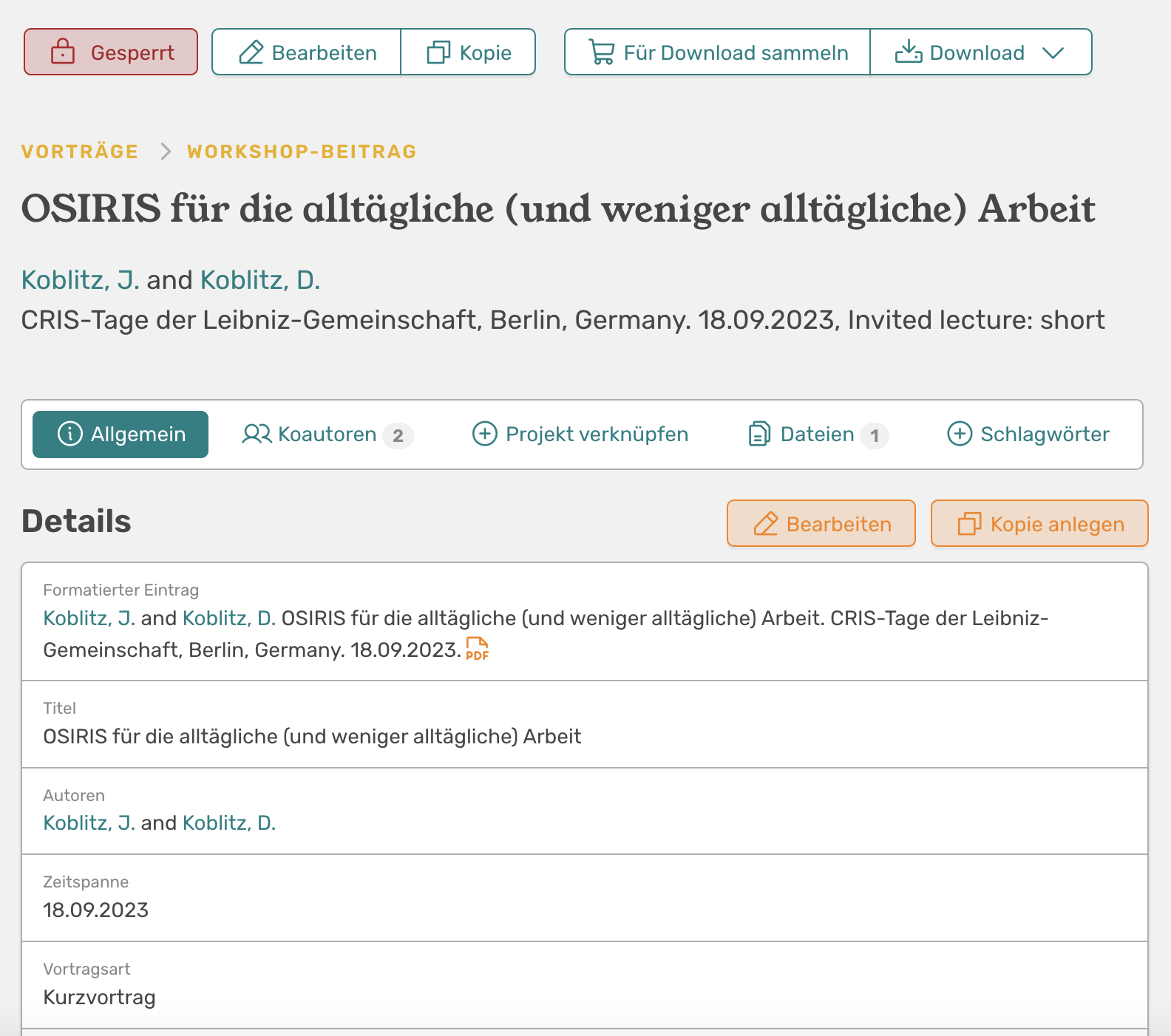
🗃️ Separately recordable data types
Here you will find an overview of the entities that can be managed in OSIRIS and how they are linked to each other. These entities form the basis for recording, managing and analysing research activities.
Entities Overview](/assets/images/entities.png "Entities Overview")
- Persons involved**
- Biographies
- Position in the company
- Affiliation to organisational units
- Various external IDs and links
-
Organisational units**
- Hierarchical structure down to team level possible
- Own definition of levels
-
Research activities (freely configurable**, also supports historical data; here are the default values):
- Publications (journal article, non-refereed, book, book chapter, preprint, thesis, other publications)
- Posters
- Presentations
- Reviews and editorships
- Teaching (courses, theses)
- Software & Data
- Prices
The "Add activity" page is the centrepiece of OSIRIS. Researchers can add their data manually or automatically via DOI or Pubmed import. Both the categories (publications, posters, etc.) and the activity types (journal article, non-refereed, etc.) can be customised, as can the description text (in orange) and the form fields. More on this in the Customisability section](/assets/screenshots/add-activity.png)
The "Add activity" page is the centrepiece of OSIRIS. Researchers can add their data manually or automatically via DOI or Pubmed import. Both the categories (publications, posters, etc.) and the activity types (journal article, non-refereed, etc.) can be customised, as can the description text (in orange) and the form fields. More on this in the Customisability section.
-
Journals**
- Are automatically entered via API when a linked activity is entered
- Impact factors can (currently) be entered manually
- Courses**
- Indexed via module numbers
- Can be linked to activities
- Keywords**
- ⚠️ Very rudimentary at the moment and can definitely be expanded
- However, there is also AI-supported indexing, so-called concepts. However, these are currently still in beta.
- Events (from
v1.3.7)- Events can be created in advance
- People can express interest or participation in conferences in advance
- Contributions can be added very easily to past conferences
- Research areas** (from version
v1.4.0)- Research areas can be created centrally
- Research areas can be added to persons, activities and projects
- Research areas can be aggregated, filtered and exported centrally
- Infrastructures** (from
v1.4.2)- Research infrastructures according to KDSF 2.0
- Incl. operating staff, annual statistics, collaborative facilities (for collaborative infrastructures) and statistics
- Projects**
- Project master data
- Link to collaborating persons
- Can be linked to activities
- Link to co-operation partners (powered by ROR)
- Statistics (from
v1.4.2) - Applications (from
v1.5.0)
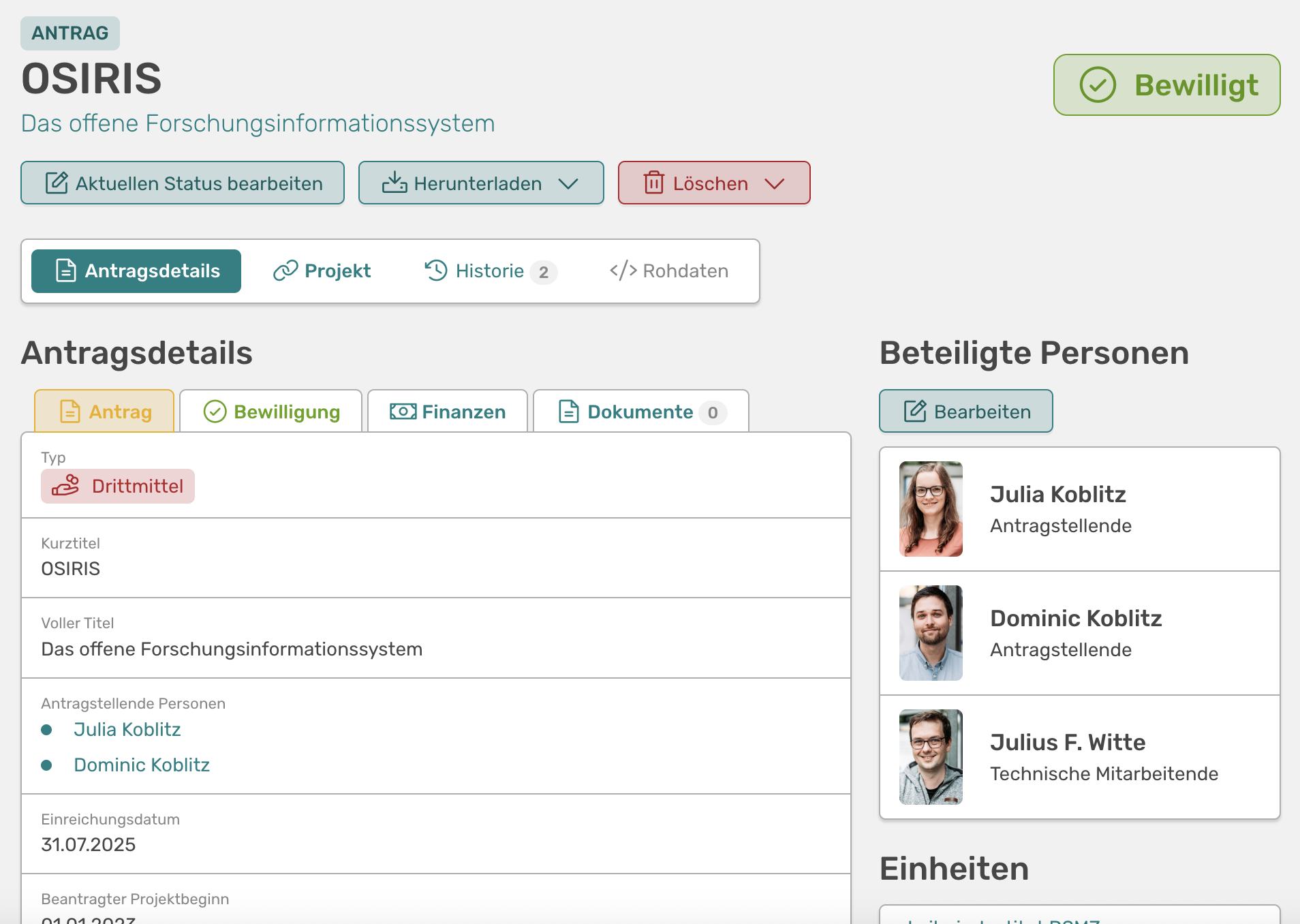
Overview of a project application in OSIRIS. The different phases, finances and documents can be seen here.
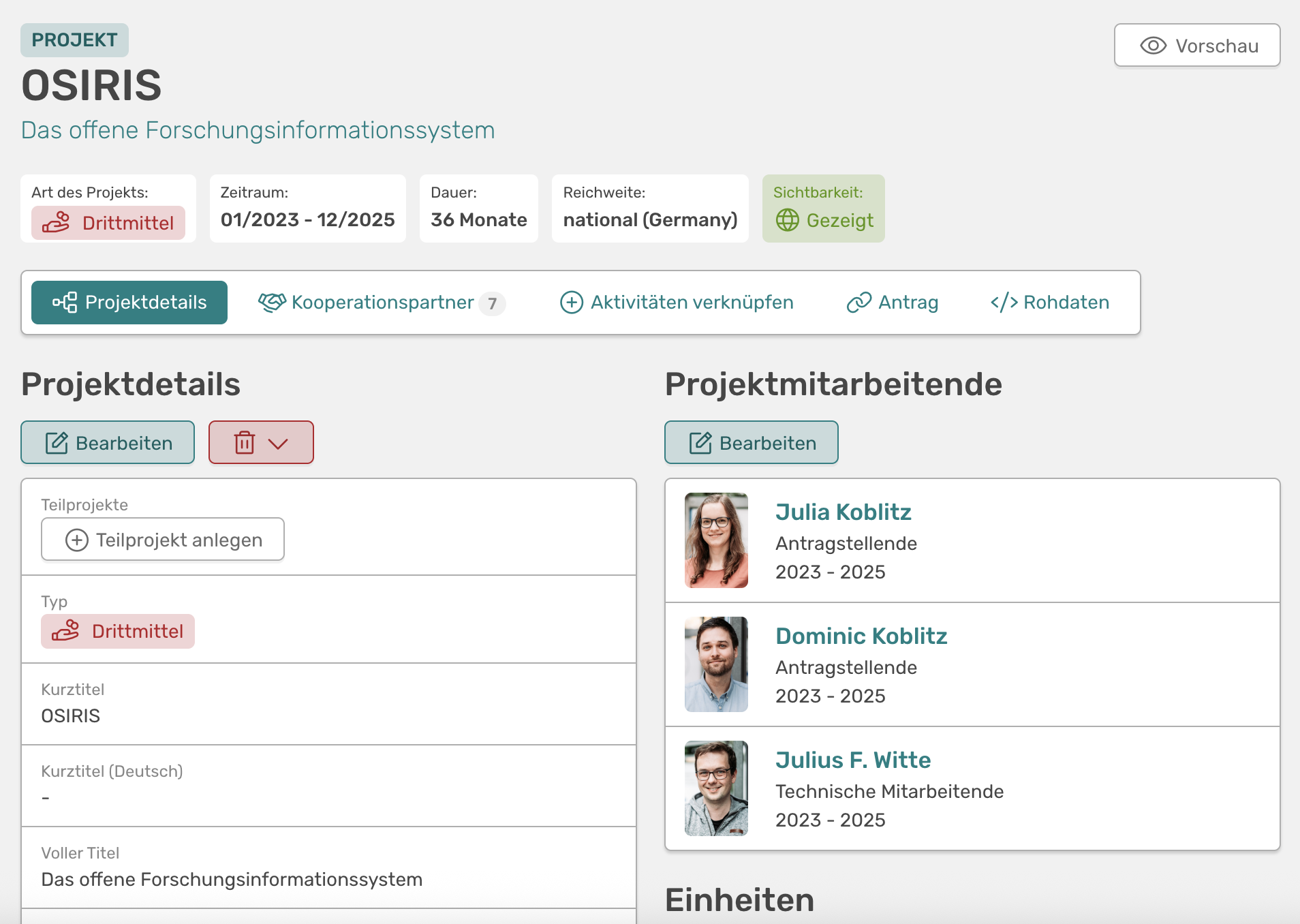
Overview of a project in OSIRIS. In addition to the details shown, you can also display co-operation partners and linked activities.
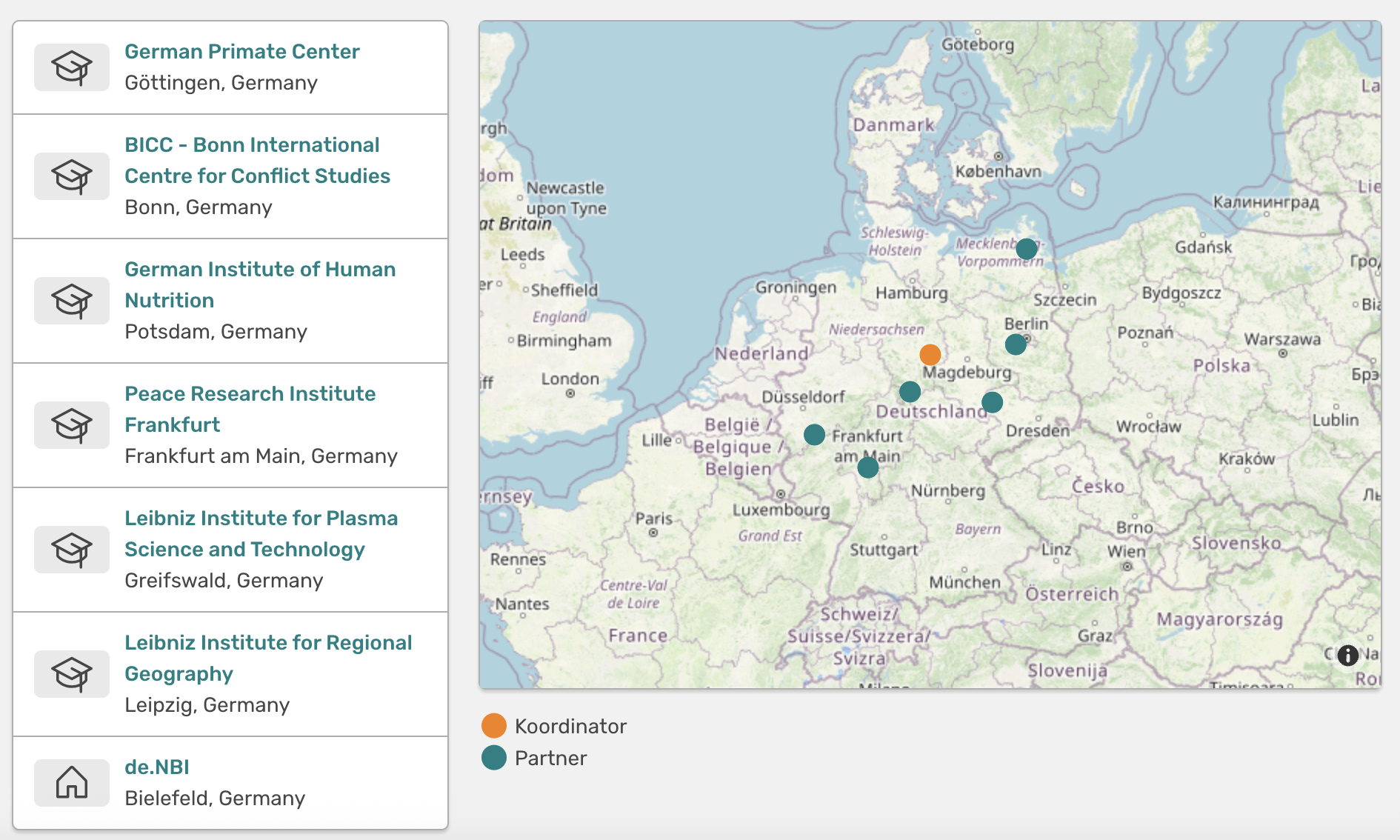
Cooperation partners of a project. On the left is the list of partners, on the right is an overview map. Your own institute is automatically entered there as long as it is configured correctly.
📊 Reporting functions
-
Analysis and visualisation**
Metrics can be drawn directly from the activities. OSIRIS prepares a series of visualisations on a dashboard for this purpose.
-
Quarter-centred**
OSIRIS records activities and organises them by quarter and year, ideal for various reporting queries. There is also the "My Year" page, which prompts researchers once a quarter to review their past activities, add to them if necessary and finally confirm that everything is in order. This in turn is displayed in the reporting dashboard.
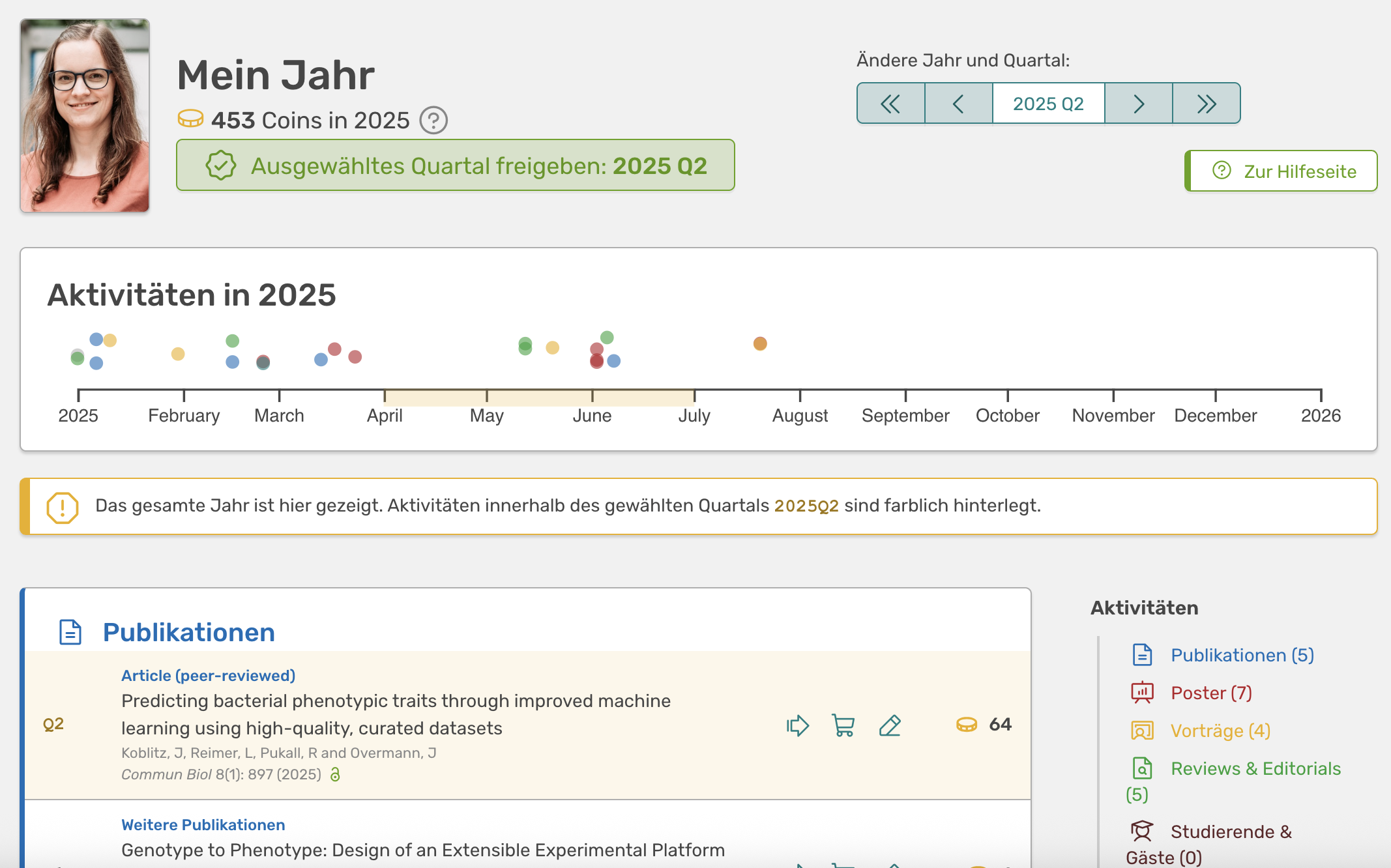
The "My year" page with the option of releasing the selected quarter. Here, researchers can check their activities and confirm that everything is in order.
-
Multiple search options
In the "All activities" tab, there are many predefined filters, e.g. by activity category, organisational unit and time period. There is also an advanced search that allows you to search almost all OSIRIS data fields. Complex queries and combinations are also possible. You can find out more about this in the Search options section below.
-
Export of activities and reports
There are a number of ways to export activities from OSIRIS. For example, data can be exported directly from the above-mentioned search options: as a Word document, Excel sheet, CSV, JSON or BibTeX (RIS and CERIF-XML in planning). You can also download individual activities or select several for download and export them collectively. All activities linked to a project can also be downloaded together in this way.
When exporting to Word, there is a special trick, because scientists can have their own name printed in bold in the export. For reporters, OSIRIS highlights all those who are affiliated with the institute.
Update v1.3.6: There is a first version of the Report Editor with which several templates can be created for different report purposes.Update v1.4.0: In the advanced search you can now select all columns that are saved in the background. These are then displayed in the interface and can be exported as Excel.Update v1.4.1`: Pivot tables (beta) offer you in-depth analysis for activities, including filters and various visualisations
-
Dashboards and visualisations**
How many users submitted their data in the past quarter? How often were authors of your institute the first or last author? Which departments of your institute work together particularly often? What is the proportion of Open Access Gold in your publications? Which institutes around the world have you collaborated with on projects? OSIRIS answers all these questions with pretty graphics and dashboards.
-
Logic checks
OSIRIS carries out a whole series of logic checks in the background, which eliminate most errors as soon as the data is entered. Suggestions are also made to users based on existing data.
-
Advanced integrations** (e.g. IDA pact query)
There is an interface to the IDA pact query. We last integrated Form 18, but this has now largely been removed. Whether further integration of other IDA forms is worthwhile has yet to be evaluated.
-
Aggregations
v1.3.4: Using the advanced search, activities can be aggregated by any field and thus totalled."It is an immense reduction in workload." - Dominic Koblitz, Controller, DSMZ
🧩 Use cases
What is the system used for and how often? What use cases are there, especially beyond the "classic" CRIS task of reporting? What are the benefits and added value of the system? What can be done with the data in the system?
Your own research - OSIRIS for researchers
The philosophy is very simple: if the researchers like to enter their data - for example, because it is quick and easy and they can even reuse the data - then they will do so. We are doing very well with this principle at the DSMZ.
That is why OSIRIS offers many functions that are explicitly tailored to the needs of researchers (after all, the main developer is a scientist and we have many fans who are happy to give us feedback). The most important feature is the own profile page, where all data is aggregated and visualised.
This gives researchers with OSIRIS a better overview of their own research. They can also easily download their own CV or selected activities and import them into their own citation programme, for example, or use them in their next application.
With Notes and File upload, OSIRIS can also be used to manage your own research in detail. For example, I can leave the title of a paper that I had in review in the notes. This helps me to keep track of my own activities without having to rummage through my mails. I can also upload both the first draft and the finished manuscript of a paper.
A reward system also comes into play with Coins and Achievements. Some researchers love to collect coins and are always happy to see new achievements in their profile. If you don't like it, you don't have to switch it on, as this feature is deactivated by default**. You also have the option of activating it only for yourself if you don't want others to see your coins. Incidentally, coins are generated dynamically and are not saved in the database. So if they are switched off, they cannot be viewed by anyone, not even by admins.
The personal profile page offers many functions and always gives you an overview of your own research (/assets/screenshots/profile.png).
The personal profile page offers many functions and always gives you an overview of your own research.
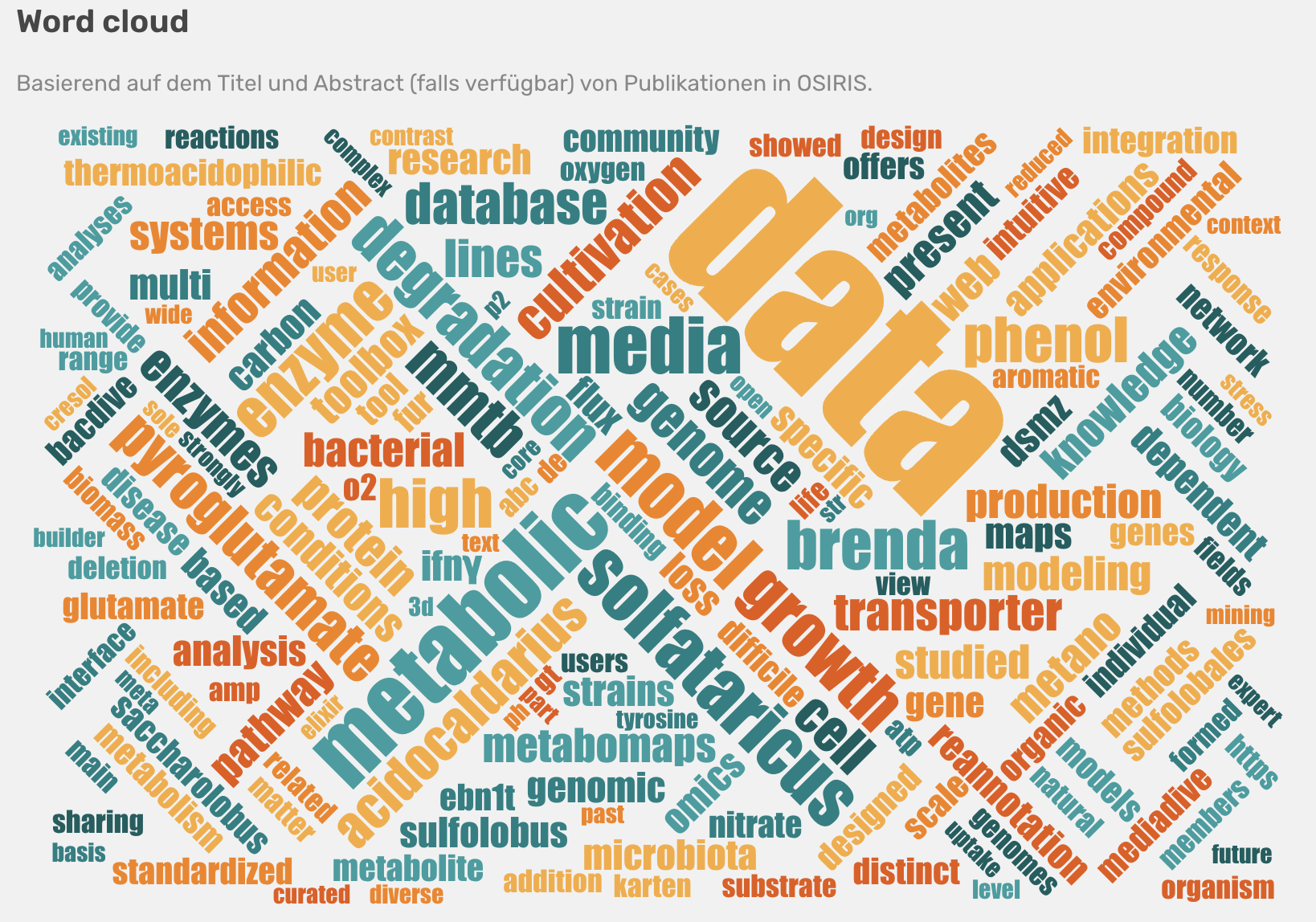
Many additional visualisations give you an overview of your own research.
"With OSIRIS, maintaining research activities becomes a pleasant side issue." - Dr Lorenz Reimer, scientist, DSMZ*
"With OSIRIS, it's actually really fun to enter your stuff." - Dr Judith Boldt, Scientist, DSMZ
"OSIRIS enables me to keep track of all my professional activities [...] and also creates helpful visualisations of my entries." - Dr Martinique Frentrup, Scientist, DSMZ
Figures, dashboards and formatted exports - OSIRIS for reporters
How reporters can use OSIRIS is actually already described very well in the section Reporting functions. It is only worth mentioning here that in addition to the classic reporting dashboards, OSIRIS also offers a variety of other visualisations, e.g. for individual persons, organisational units, open access and collaborations:

External visibility of our research - OSIRIS for institutes
One of the most important aspects of a CRIS is its external presentation. How do we represent our institute, how do we present our research? OSIRIS supports the external presentation of entire institutes, organisational units and even individuals. There are three basic concepts.
- Low-Level: Connection of your own website via the REST API
- Mid-Level: Integration of ready-made data packages via the Portfolio API
- High-Level: Complete use of Portfolio as an external research portal (will go online later this year as a pilot for the DSMZ)
Portfolio is an addon to OSIRIS that builds its own website based on the data in your OSIRIS. You can see it as an additional website that presents your research to the public. Portfolio is currently under development in cooperation with the Leibniz Institute DSMZ and is scheduled to go online at the DSMZ later this year. In the screenshot below you can see that the design of Portfolio is not based on that of OSIRIS, but can be customised to your own website.

Portfolio is an OSIRIS add-on that allows you to prepare your research information for the external presentation of the institute.
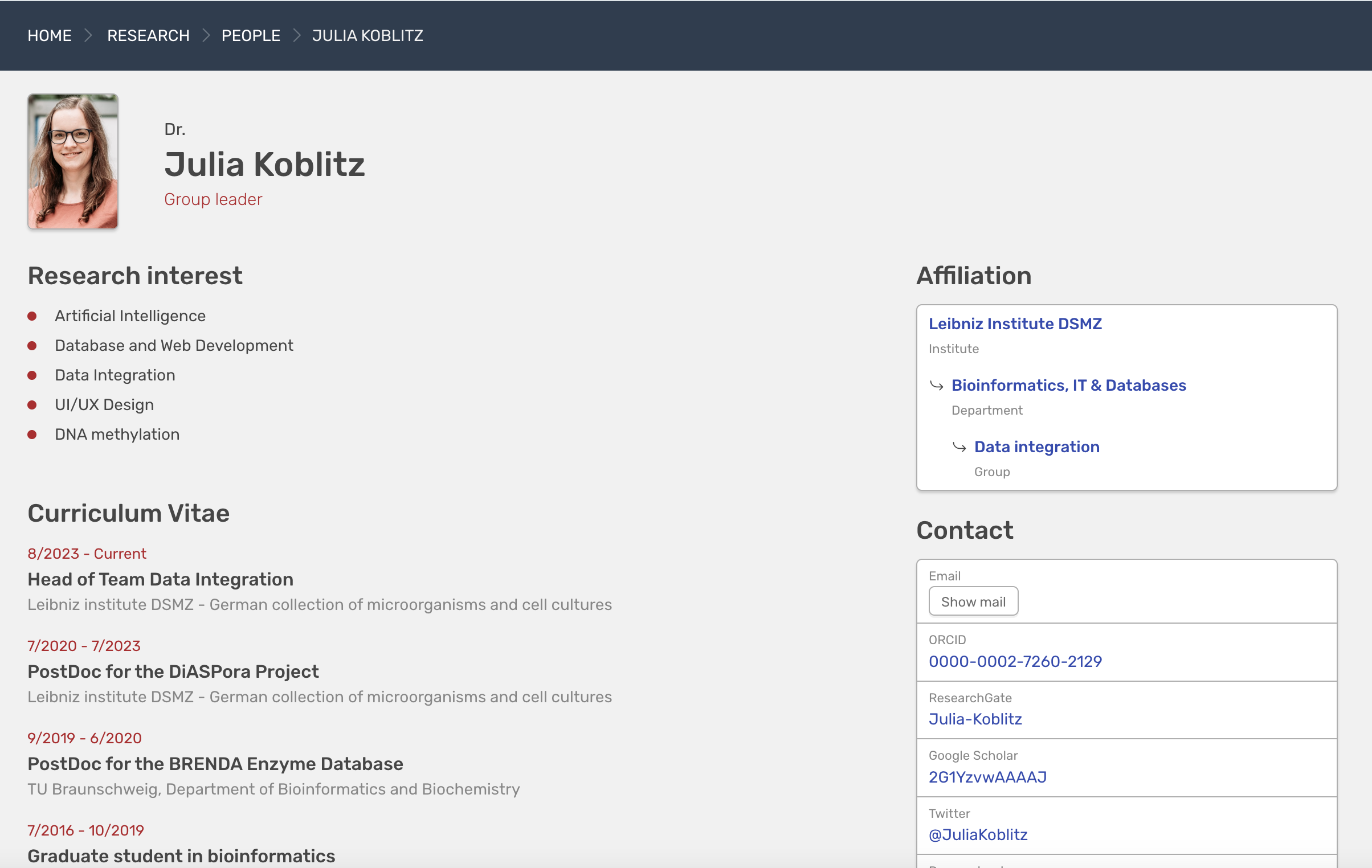
With the OSIRIS portfolio it will be possible to integrate ready-made widgets into your website or to generate a complete portfolio page. What you see here is just the prototype](/assets/screenshots/portfolio-publications.png)
With the OSIRIS portfolio it will be possible to integrate ready-made widgets into your website or to generate a complete portfolio page. What you see here is just the prototype.
🛡️ Role and rights model
How detailed is the roles and rights model? How many roles are there (perhaps with examples)? At what levels can authorisations be defined? Can authorisations be transferred between users? Does the roles and rights model also take groups into account? How flexible are the roles and rights model and the options for defining authorisations?
OSIRIS has a moderately complex roles and rights model. There are five roles by default: User (everyone is a user), Scientist, Human Resources (PA), Editor (Controlling in our case), and Admin.
There are currently (as of v1.3.7) 35 rights that can be assigned to the various roles as required. If you assign a role to "User", every user of the system has the rights.
Several roles can be assigned to one person. As long as one of the roles has the right to do something, the user has the right.
Transfer of profile maintenance
A user can transfer the complete maintenance of their profile to another person. This person could be an assistant, secretary or project manager, for example, and then has full access to the profile.
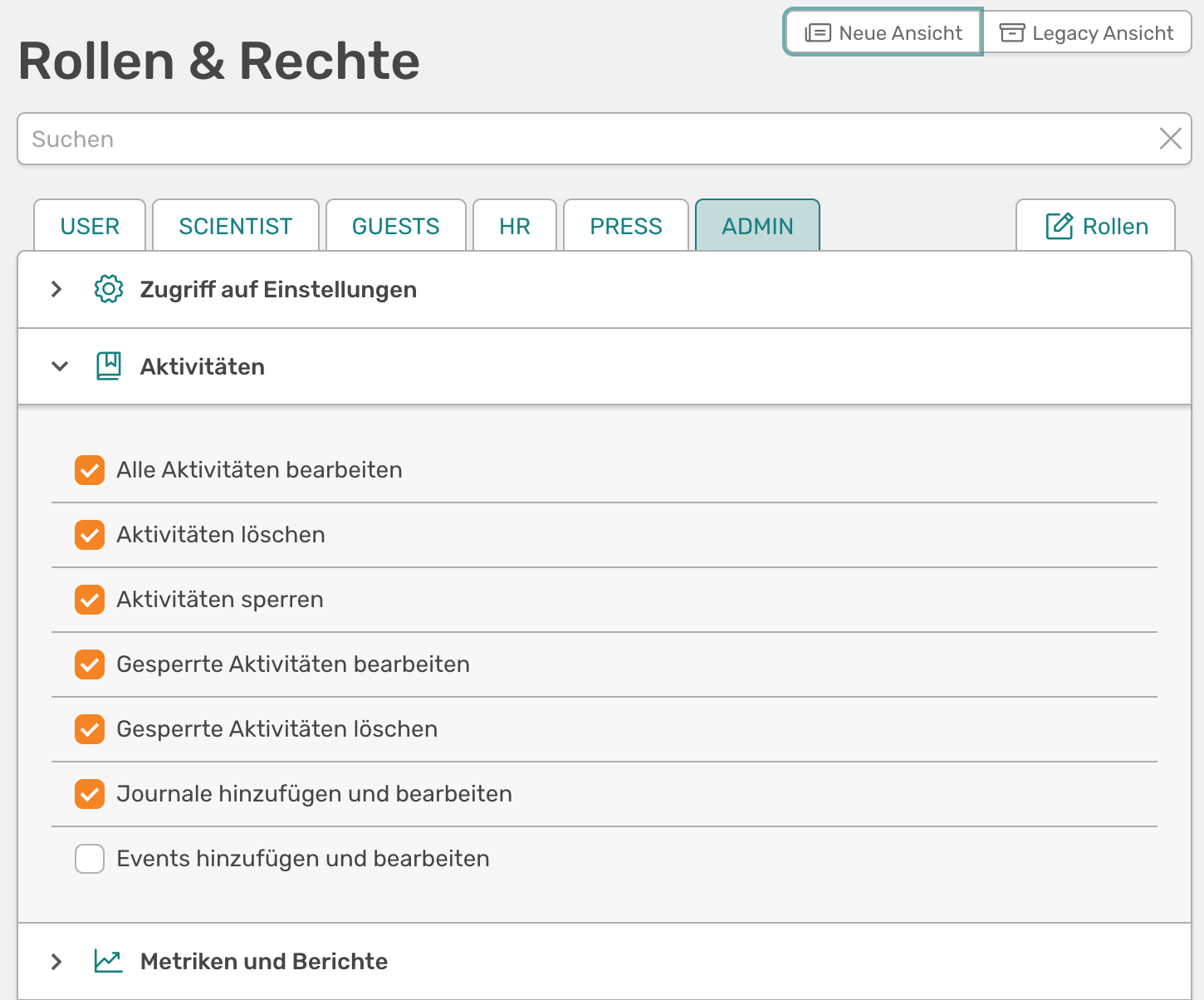
The roles and rights management in the admin dashboard (new view from v1.5.0)
🖍️ Quality assurance
Does the system offer workflows for checking, validating and confirming entries? How detailed are such workflows and for which data are they available? What comment and notification functions are available? Are there automatic quality assurance processes such as controlled vocabularies when entering affiliations (e.g. with ROR integration)?
**OSIRIS tries to avoid errors at the entry stage and relies on the principle of multiple checks by authors, but does not yet support extensive workflows.
Avoidance of errors through the interface
OSIRIS is based on the premise of avoiding errors during data entry rather than running workflows over the data afterwards. For example, many text fields use auto-completion to suggest values that have already been entered, e.g. conferences, locations and authors.
In the screenshot below, for example, you can also see how journals are added in a standardised way. When you enter a journal, a widget opens. At first, only the upper part is shown, in which all journals already available in OSIRIS are displayed. If the journal you are looking for is not there, you can repeat the search in the online catalogue (OpenAlex) and possible journals will be suggested based on the search. Clicking on a tick not only adds the journal to the publication, but also saves all other information about the journal. As there is no free text at this point, journals cannot be entered incorrectly. The same applies to courses, which can also be managed centrally and associated with activities.
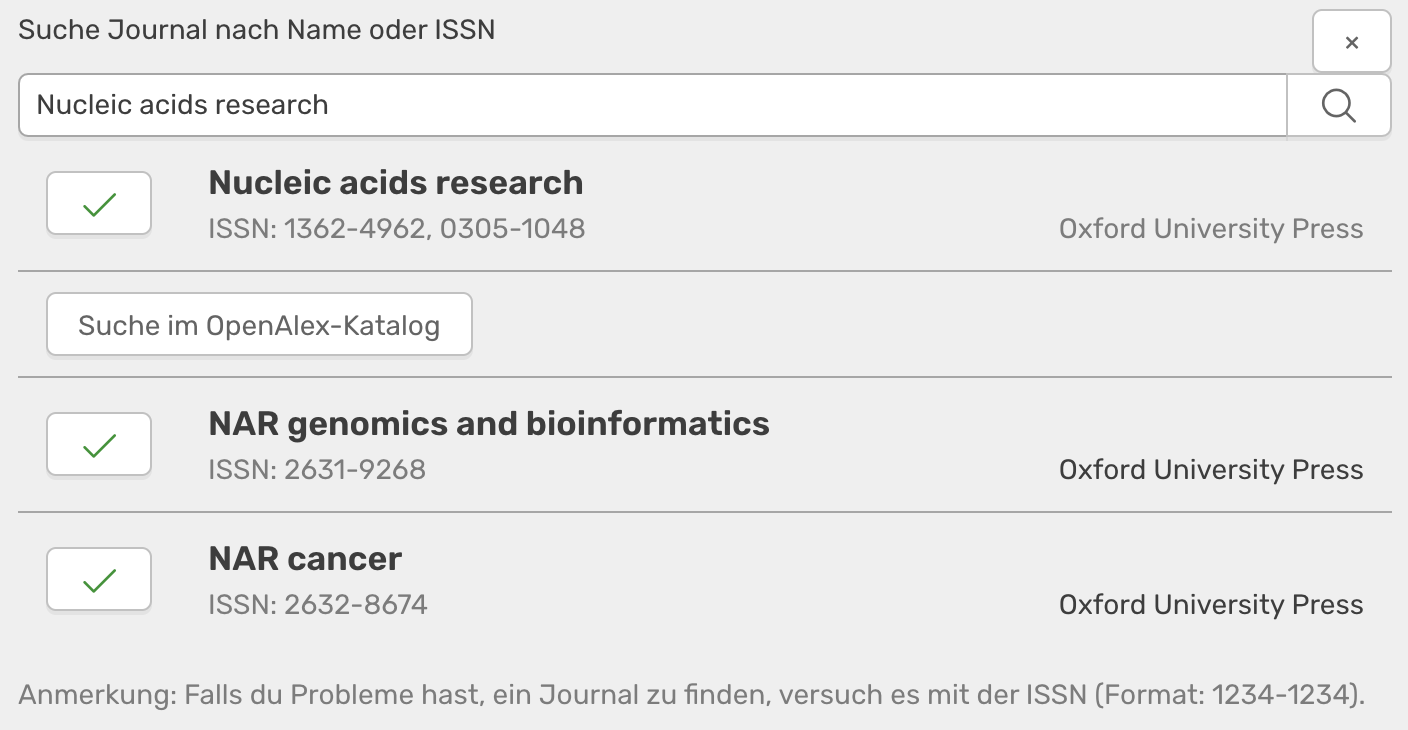
Widget that opens when you click on the data field shown above. Here you can search for existing journals in OSIRIS and in the online catalogue. This avoids errors.
There are also further query mechanisms: you cannot select a year 10 years into the future or before 1900. Mandatory fields cannot be left blank. OSIRIS issues a warning if you want to add a data record without persons affiliated with the institute in the author list (you can still do this, for example to maintain your personal profile, but such activities are filtered out for reporting purposes, for example).
Comment and notification functions
There are two main comment functions: the note and the editor comment.
The note is available for every activity. It is hidden behind a drop-down box (see screenshot below) at the end of the form field for adding and editing an activity. Authors can write notes for themselves or messages to editors here, which are then visible to this group of people on the overview page of an activity. Who exactly can see these messages apart from the authors is defined via the roles.
The Editor comment is only visible if you are editing an activity in which other authors are involved. Here you can leave a comment for these other people explaining what exactly you have changed.
There is a whole range of notifications in OSIRIS. Users are notified when:
- ... there is a need for action or awareness regarding activities. This currently includes the following:
- A new activity has been added for you
- One of your activities has been edited (co-authors can see your editor comment there, see last screenshot)
- An activity is entered as "Online ahead of print" and you are reminded to check this status
- A thesis that you are supervising has expired but is still set to "in progress"
- You have open-end history data (e.g. committee or editor memberships) and are asked whether they are still up to date
- Projects of yours have expired but are not yet marked as "completed"
 Unresolved warnings for activities prevent the quarter from being released.
- ... there is a new update to let you know what has changed.
- ... a quarter has passed and the activities can now be checked and confirmed.
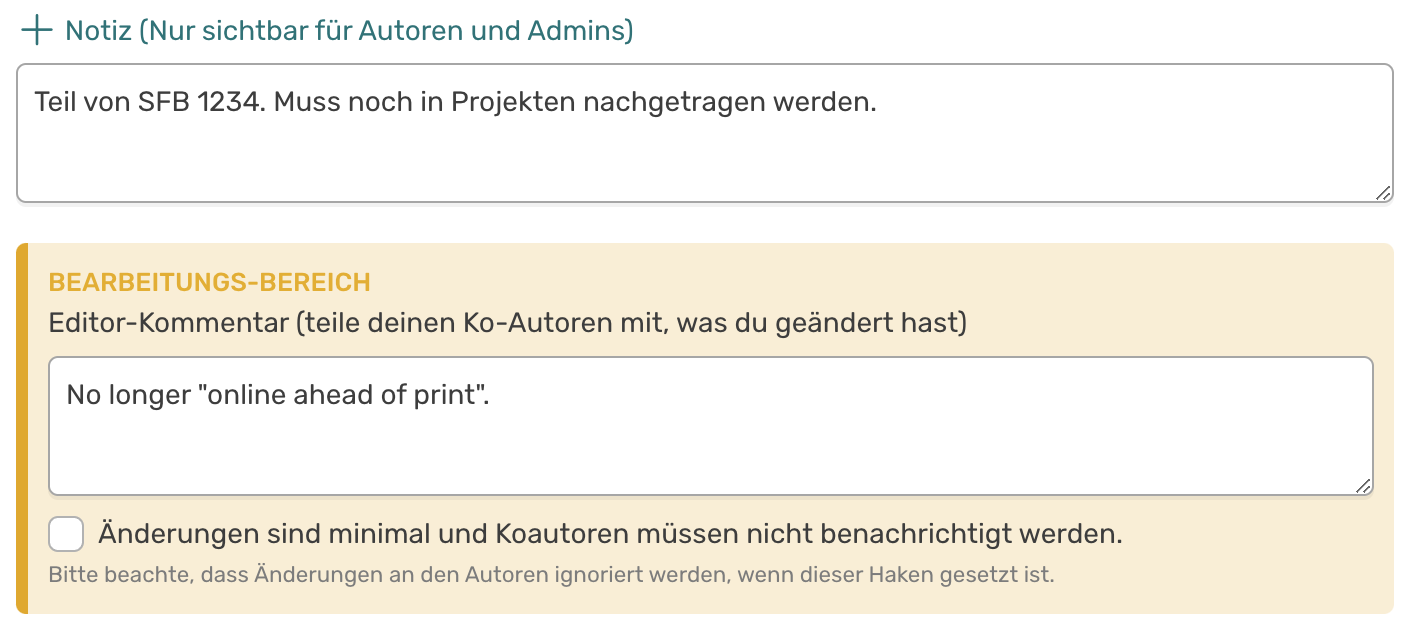
Commentary functions in the form for editing an activity
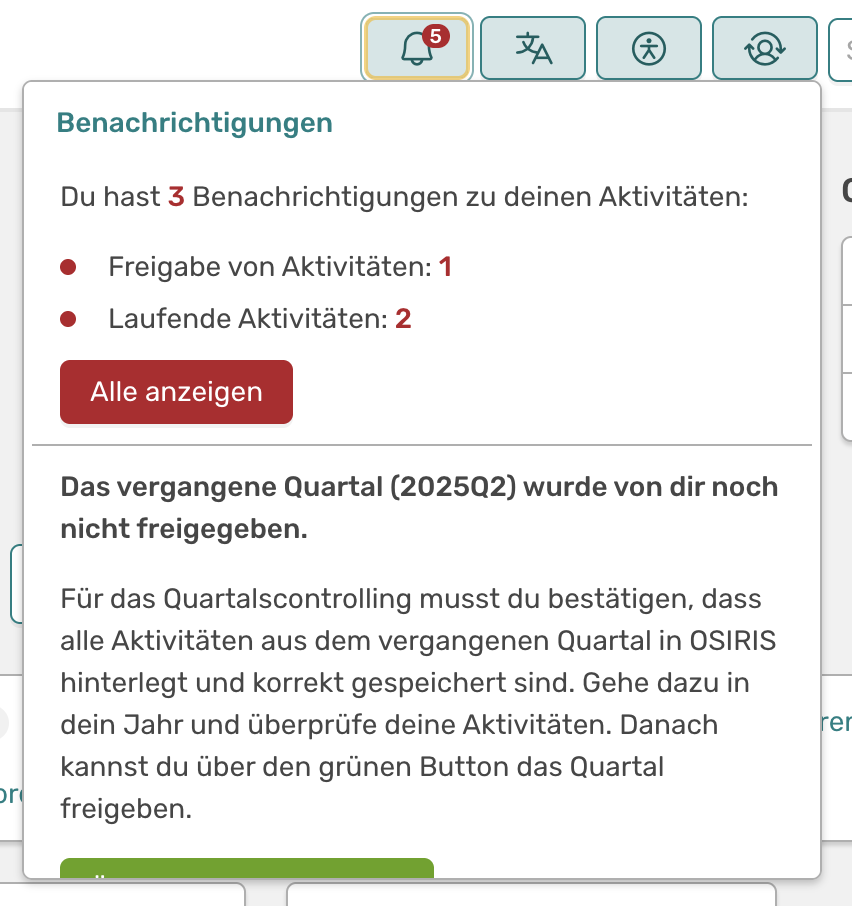
Notes on new notifications on the personal profile page
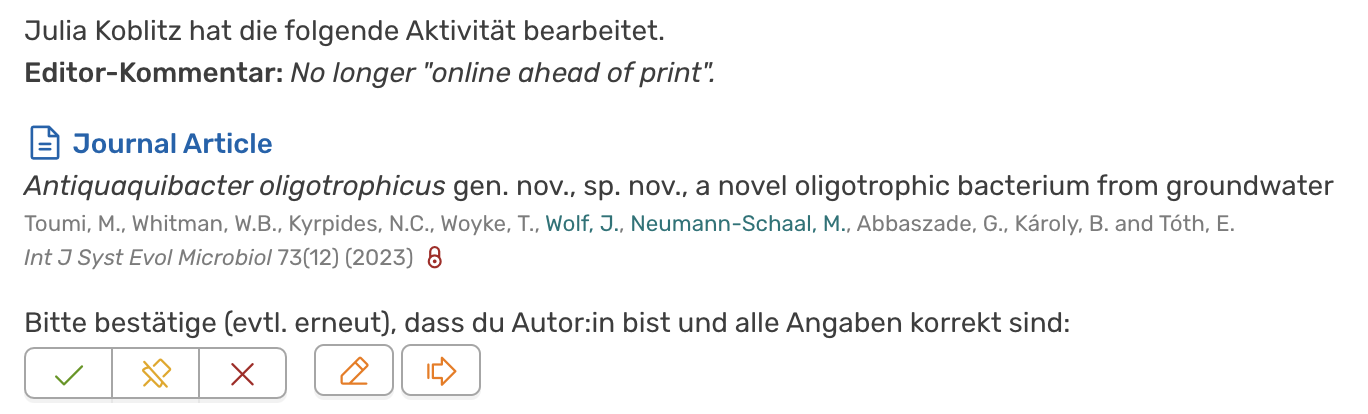
Notification of a user about an edit
Workflows?
A "workflow" in OSIRIS can only be described as something like the Queue: this is where online sources are regularly tapped to see whether there might be new publications for your researchers. However, this is not simply entered into the database, but sent to the researchers for checking.
⚠️ We have workflows on the screen and are planning to add them in an upcoming release. However, OSIRIS does not currently support multi-stage workflows, such as those found in GRIS.
↔️ Interfaces
**OSIRIS offers a variety of interfaces to internal and external systems.
- Internal systems**
- User administration can be carried out via LDAP. Users are synchronised with the Active Directory and authentication also works via this.
- Sources for data import
- Interfaces to CrossRef, DataCite and OpenAlex to enable DOI-based imports of activities
- As not every source includes all data, they have all been added and are scanned one after the other as soon as a user enters a DOI.
- A great deal of data is accessed via the interfaces and even projects and publications can be linked automatically using funding codes. It is therefore recommended not to enter literature manually, but always via the DOI.
- Interface to Pubmed to import biomedical research literature via PubMed ID
- Interface to OpenAlex to enable automated import into a "queue"
- Interface to OpenAlex and DOAJ to record journals in a standardised way
- Interface to ROR to add institutes for project collaborations
- Interfaces to CrossRef, DataCite and OpenAlex to enable DOI-based imports of activities
-
Export interfaces**
- There is an interface to the IDA pact query (see above in the Reporting section)
-
There is an API to export data either standardised or ready formatted to the website
v1.3.2: API documentation has been added, as well as API keys and more filter mechanisms. Push options are still missing. -
With OSIRIS Portfolio there is also a possibility to generate a complete research website from OSIRIS. Feel free to contact us to find out more or have a look here: https://osiris-app.de/portfolio
- There are lots of different download formats (see above in the Reporting section)
🧾 Support for persistent identifiers (PIDs)
**OSIRIS uses PIDs where possible and appropriate to precisely identify activities, persons and institutions.
-
PIDs for activities**
As already discussed in the Interfaces section, OSIRIS uses DOIs and Pubmed IDs for activities (these do not necessarily have to be publications; Zenodo, for example, also provides DOIs for posters, presentations, code, etc.).
-
PIDs for persons**
People can enter their Google Scholar ID in order to import their publications (rather poorly, thanks to terrible standardisation by Google).
⚠️ OSIRIS currently only supports ORCID for user searches.
-
PIDs for institutions
OSIRIS supports the OpenAlex ID for institutions in order to export legacy data and feed the queue.
OSIRIS supports the ROR-ID and uses it to query details about co-operation partners in projects.
🔍 Search function
What search options are available? Is a distinction made between simple and advanced search? How much differentiation can be made in the advanced search? Is it possible to search with operators (AND, OR, NOT)? Is there also a full-text search (if full texts are also included in the system)? Can search queries be saved?
**OSIRIS offers a simple and fast search and a very sophisticated expert search.
The simple search in All activities
There are several search functions in OSIRIS. Probably the most frequently used is the one in the "All activities" page. This table supports a full-text search via a single search slot on one side and offers the following ready-made filter options on the other:
- By type of activity
- By affiliation
- By organisational unit
- By time period
- Other (Online ahead of print)
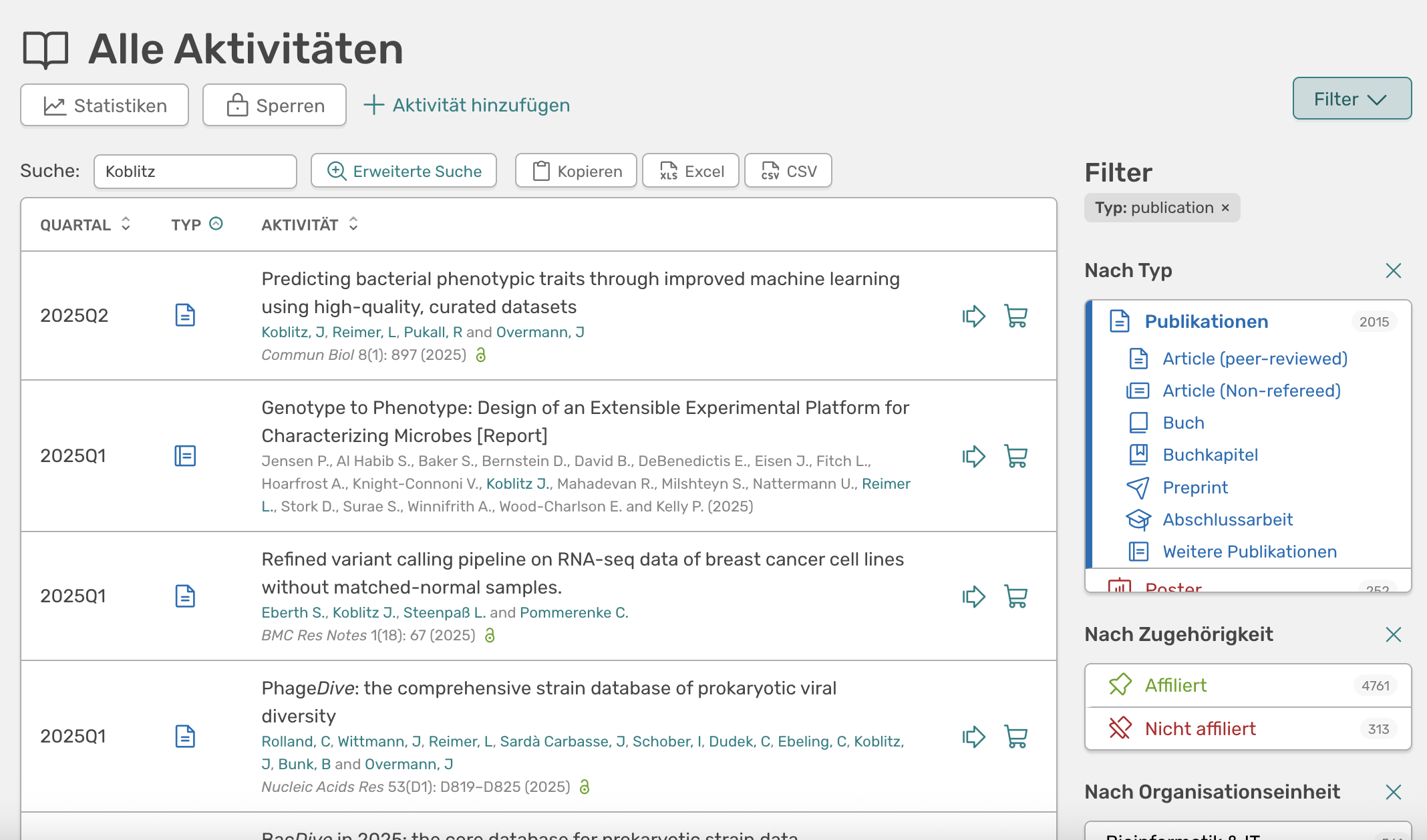
Screenshot of the simple search on the "All activities" page
The advanced search
For those for whom the simple search options are not enough, there is the advanced search. Complex queries can be built here, which can also be nested and grouped with AND/OR. Each field supports corresponding operations (equals, contains, starts with, ends with, greater than, etc.)
You can also save the filter string and the query generates a unique link that you can save or share with colleagues.
Update v1.3.4: Many improvements to the search have been added, such as aggregations, an expert mode where you can write your own MongoDB queries and the saving of frequently used searches.
Update v1.4.0: In the advanced search you can now select all columns that are saved in the background. These are then displayed in the interface and can be exported as Excel.
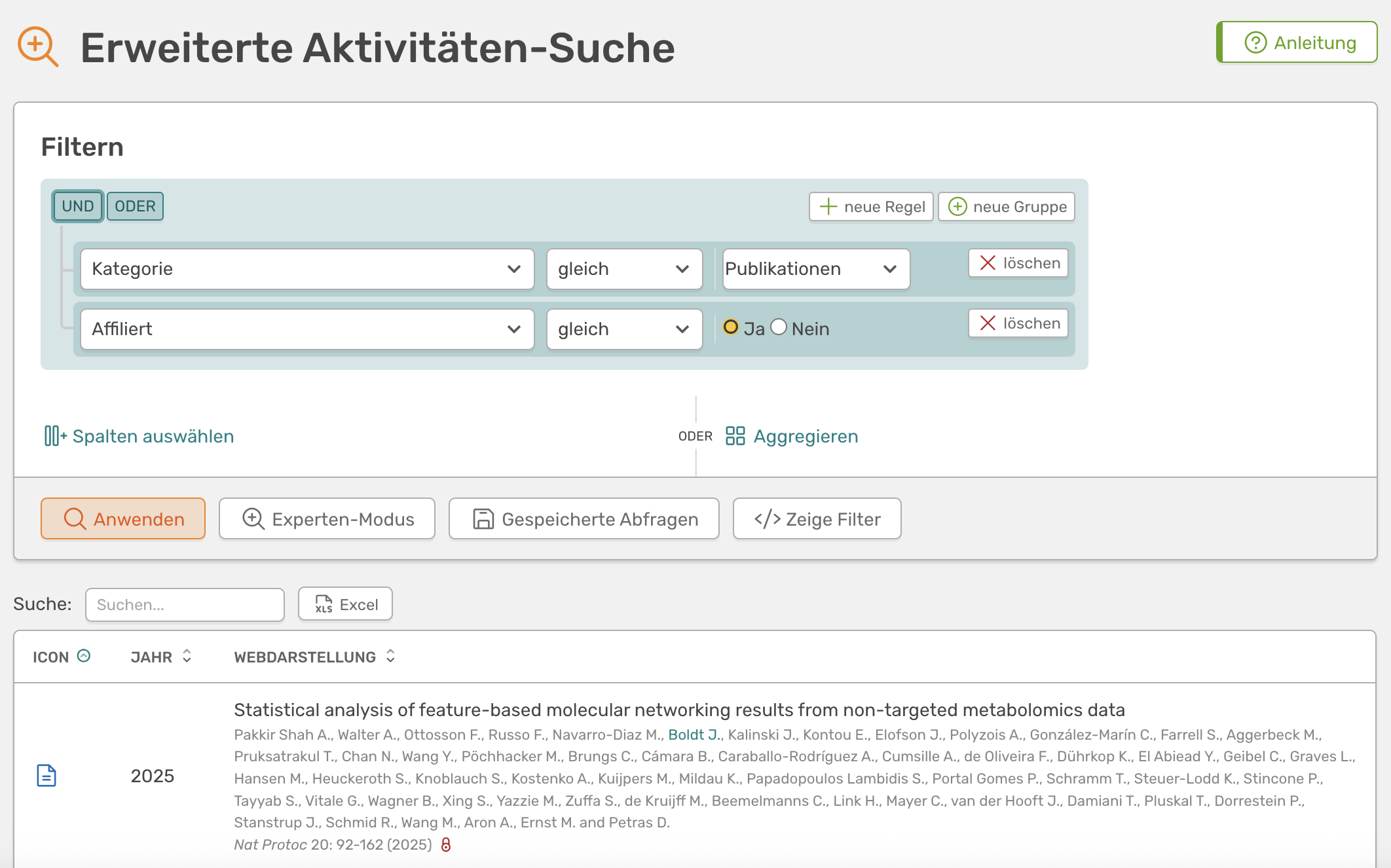
An overview of the advanced search in OSIRIS
As of v1.4.0, columns can be selected for display in the search. The interface supports you in this and shows which columns you use for which activity types and which are not filled at all (greyed out)](/assets/screenshots/advanced-search-columns.png)
As of v1.4.0, columns can be selected for display in the search. The interface supports you in this and shows which columns you use for which activity types and which are not filled at all (greyed out).
🪄 Customisability / Customization
What options are there for the institution to customise the data types, forms and structures? Can new data types be created and existing ones changed? Can mandatory fields be defined? Can workflows be created and customised? Can the reporting be customised or configured? What customisation options are available for the design?
**OSIRIS offers many configuration options, almost all of which can be carried out directly via the user interface and without programming knowledge.
Any configuration of the content (we are not talking about server configuration here) can be carried out via the admin panel. By default, only the admin defined during installation has access to this panel, but they can also grant access to others.
Basic settings
In addition to the start year of OSIRIS, the institute can of course also be customised. Some information can be entered, such as the abbreviation, name, location and ROR ID. You can also upload a logo, which will then appear in the top right-hand corner.
Organisational units
With v1.3.0 organisational units (OU) have been completely restructured. Previously there were only "departments", now you can theoretically map the entire organisation chart (see screenshot). A person can be a member of several OUs and an OU can be managed by several people. This gives you many options for aggregating and visualising data. If you do not need all this, it is sufficient to add all employees to the institution only.
A chord diagram shows the collaboration of a department (in this case BID) with the other departments. Publications from 5 years are taken into account](/assets/screenshots/collaboration-chart.png)
A chord diagram shows the collaboration between one department (in this case BID) and the other departments. Publications from five years are taken into account.
A section of the OSIRIS organisation chart view. Working groups can be expanded and collapsed as required](/assets/screenshots/organigram.png)
A section of the OSIRIS organisation chart view. Workgroups can be expanded and collapsed as required.
Configure activity types
Activities are categorised in OSIRIS on two levels: there are categories and types. To put it briefly, categories group activity types. Activities are assigned to types. Something like this:
Categories > Types > Activities
OSIRIS comes with some standard activities (see above). However, you can change these completely. You do not produce any software? Delete the category. You need more types for presentations? Workshops? Panel discussions? Round tables? Add them.
In the screenshot on the right you can see which setting options are available for an activity type. You can define which is the parent category, which means that types can also be moved to other categories.
Then you can make basic settings. The ID is required and must be unique. The icon can be selected from an (open source) library with more than 7000 icons. The name and description can be defined in both German and English. The description is visible to your users as soon as they select an activity type. Here you can define in detail what belongs there.
Next comes a core feature of OSIRIS: the modules. There are currently 54 modules in OSIRIS, i.e. 54 different form fields from which you can assemble your form for the activities. You can use drag & drop to adjust the order of the fields and double-click to determine whether a field is a mandatory field. You can find out more about this (including a list of all modules with examples) here.
The Templates are used to determine how the activities are displayed. A distinction is made between print (e.g. for Word export) and the web view. In the web view, there is a title and a subtitle. The templates support HTML, various modules and even default values. You can find out more about this in the Documentation.
With the Coins you can define how many coins your users receive for the activity. Of course, this only makes sense if you have activated the coins. You can also use modules again, more precisely {if} to calculate with impact factors and {sws} to calculate with semester hours per week.
Finally, you can deactivate a type. Of course, types can also be deleted, but only if no activities are linked to them. However, if you no longer want to include an activity used in the past in the future without deleting existing data records, you can deactivate the type here. It is then no longer possible to create new activities with this type.
Update v1.3.1: You can now completely configure your own fields in the admin area. It is also possible to create your own lists, which are then available for selection, and to specify default values.
Update v1.5.0: You can now also customise existing vocabularies, such as the access types of infrastructures, the list of possible sponsors of projects or the event type. You can find this setting in the admin area under Contents → Vocabulary.
An example of how an activity can be configured (/assets/screenshots/configure-activity.jpeg)
Projects
As of v1.5.0, projects and project applications can be fully configured. It is possible to create your own project types and specify whether an application must be created beforehand for a project type or whether the project type can be created directly. Different form fields can be used for each application phase and for the projects, including custom fields.
Persons
As of v1.5.0, personal data can also be configured. When using LDAP, individual fields can also be synchronised directly with it and can then no longer be edited in OSIRIS itself. It is also possible to set a list of possible positions and define keywords.
Infrastructures
From v1.5.0 infrastructures can also be configured. The individual data fields can be switched on or off, user-defined fields (custom fields) are supported and it is possible to customise vocabularies such as the category and type of access.
Roles and rights
Roles and rights can also be configured, see section "Roles and rights model".
Functions
As each institution has different needs and use cases, individual features of OSIRIS can also be switched on or off. For example, the coins and achievements can be switched off globally (users can also switch them off individually for themselves). Add-ons for guest registration and reporting, projects and concepts can all be deactivated if necessary.
It is also planned that upcoming features will be switched off by default so that they do not introduce unwanted functions into the system during an update. They must then be actively switched on.
An excerpt of the functions that can be switched on and off within OSIRIS.
Imprint, data protection and links in the footer
From v1.5.0, the text of the legal notice and privacy policy, which can be found in the footer, can be completely customised. It is also possible to add further links to the footer, for example to company agreements.
🧱 Extensibility
**OSIRIS is extensible according to open source principles.
As OSIRIS is completely open source, it can be easily extended. Ideally, this is done according to open source principles and the new code is made available to the main branch and thus to the public.
The following optional add-on modules are available (also open source):
in developmentThe guest form, an extra web tool that can be used to register guests at the institute. It can also run on another server if your OSIRIS is not accessible from outside.- The OSIRIS portfolio, which is used to generate a representative external website from the data maintained in OSIRIS (see Use Cases section)
📡 Update cycles
How often and to what extent are there system updates? Do the updates have to be accepted or is this (partly) optional? How do the update processes work? What influence do users have on the general further development of the system?
**OSIRIS is regularly updated with major and minor updates.
Bug fixes are always installed as quickly as possible. If you host OSIRIS yourself and maintain it on your own, you can of course also install the updates as you wish. If you use the services of OSIRIS Solutions, updates will also be coordinated with you.
You can find out how to update OSIRIS in the OSIRIS wiki.
🔧 Maintenance and support
**OSIRIS relies on an open source community, but there is also a commercial solution for support.
OSIRIS has several levels of support. The programme itself is open source and free of charge (see section Costs and licence model). If you install, maintain and host it yourself, you still have the option of using Community Support. To do this, create a ticket on GitHub and you will usually receive a relatively quick response (within a few days). Whether and when a larger ticket is processed naturally depends on developer capacity and development time, so it is impossible to say in general terms. However, I can assure you that reported bugs (especially system-critical ones) are dealt with very quickly.
There is also additional paid support for OSIRIS from the company OSIRIS Solutions GmbH. Support is currently offered for the following topics, among others:
- Hosting
- Initial setup
- training courses
- Legacy data import
- Further development
You can find more information here: https://osiris-solutions.de/.
⚙️ Technical requirements
How and where is the system hosted? Are there different models to choose from? If the institute hosts (or can host) the system, what technical requirements must the server fulfil? What other technical infrastructure is required?
OSIRIS requires a virtual machine with a web server, e.g. Apache2 or nginx, on which you have to install MongoDB. It can even be installed under Windows and with Docker. For exact details and comprehensive installation instructions, please refer to the installation instructions.
OSIRIS Solutions can also take over the hosting for you. For more information, please contact us directly.
💶 Costs and licence model
The licence
OSIRIS is open source software and free of charge. There will be paid services for the software in the future, but the software itself will never have licence costs.
-
If you are interested, you can find the complete licence here.
 1
 2
 3
 4
 5
 6
 7
 8
 9
10
11
12
13
14
15
16
17
18
19
**Copyright (c) 2022 Julia Koblitz**

Permission is hereby granted, free of charge, to any person obtaining a copy
of this software and associated documentation files (the "Software"), to deal
in the Software without restriction, including without limitation the rights
to use, copy, modify, merge, publish, distribute, sublicense, and/or sell
copies of the Software, and to permit persons to whom the Software is
furnished to do so, subject to the following conditions:

The above copyright notice and this permission notice shall be included in all
copies or substantial portions of the Software.

THE SOFTWARE IS PROVIDED "AS IS", WITHOUT WARRANTY OF ANY KIND, EXPRESS OR
IMPLIED, INCLUDING BUT NOT LIMITED TO THE WARRANTIES OF MERCHANTABILITY,
FITNESS FOR A PARTICULAR PURPOSE AND NON-INFRINGEMENT. IN NO EVENT SHALL THE
AUTHORS OR COPYRIGHT HOLDERS BE LIABLE FOR ANY CLAIM, DAMAGES OR OTHER
LIABILITY, WHETHER IN AN ACTION OF CONTRACT, TORT OR OTHERWISE, ARISING FROM,
OUT OF OR IN CONNECTION WITH THE SOFTWARE OR THE USE OR OTHER DEALINGS IN THE
SOFTWARE.
Costs and personnel
Of course, open source software also costs something. No licences, but servers have to be provided and staff paid. After all, maintenance and support cannot be done alone.
Experience: there are 2 people at the DSMZ who work with OSIRIS: Dominic (controller), who works with the data as an editor, makes quarterly queries and trains new employees. Julia (bioinformatics scientist), who maintains and develops OSIRIS alongside her actual work as head of the working group. According to my estimate, this is less than 0.5 FTE.
Additional service
If this is still too much for you or you are not sure how best to go about it, the company OSIRIS Solutions can support you. We have already assisted several institutes with their implementation process.
👥 User-Community
There is a German-speaking OSIRIS community that meets every two months. There are also regular newsletters about new content and updates. If you would like to find out more or have a look around, you can find out more here on the OSIRIS wiki: https://wiki.osiris-app.de/topics/community/
⚠️ Disadvantages and room for improvement
I have already covered all the gaps and disadvantages (that I know of!) in the previous sections and always marked them with an exclamation mark: ⚠️